

CtrlZone
TR Demo

Management software for esports centers and iCafesYour venue’s
operating system

Your venue’s entire operation in one program. From sessions to the front desk, from membership to tournaments, everything is under your control.

4modules under one account and one license
7/24uninterrupted operation; the venue keeps running even if the internet drops
₺0free edition with no time limit
5651compliant logging, no extra software needed
// KEY FEATURES

Everything you need to grow your venue

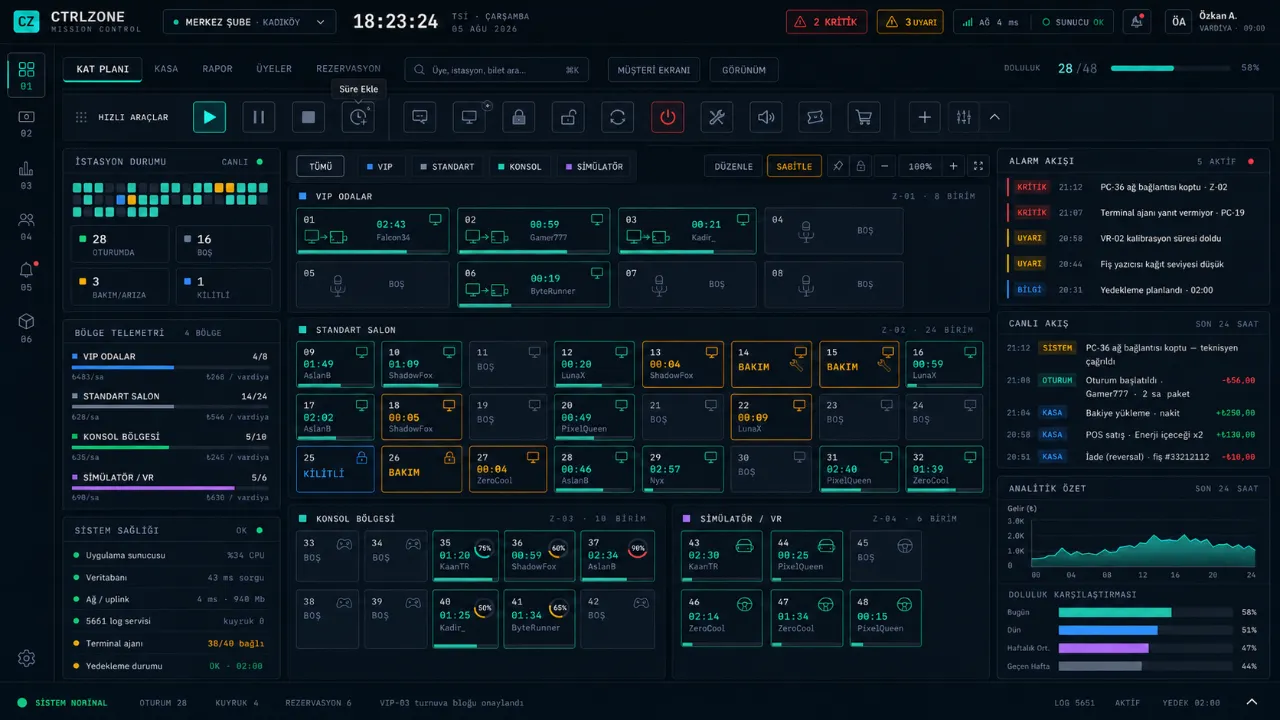
The whole venue on one screen

Occupied, free, reserved and faulty stations are visible live; starting sessions, adding time, moving stations and staff calls are a right-click away.

Details
CtrlZone floor plan

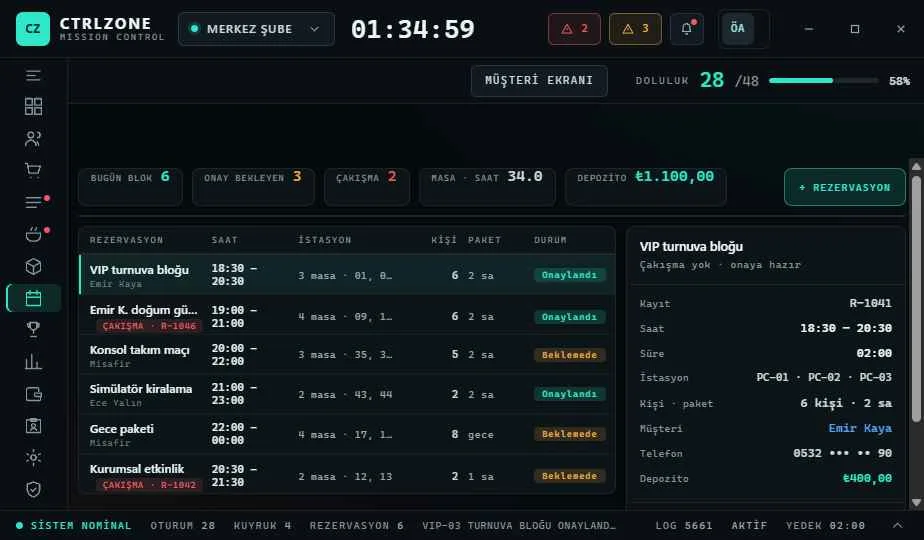
Charges are calculated automatically

Rates by hour, day and zone; member balance, bonus and discounts all come from one pricing engine. Staff only enter the cash count; the manager sees the cash difference.

Licensing Model
CtrlZone rates screen

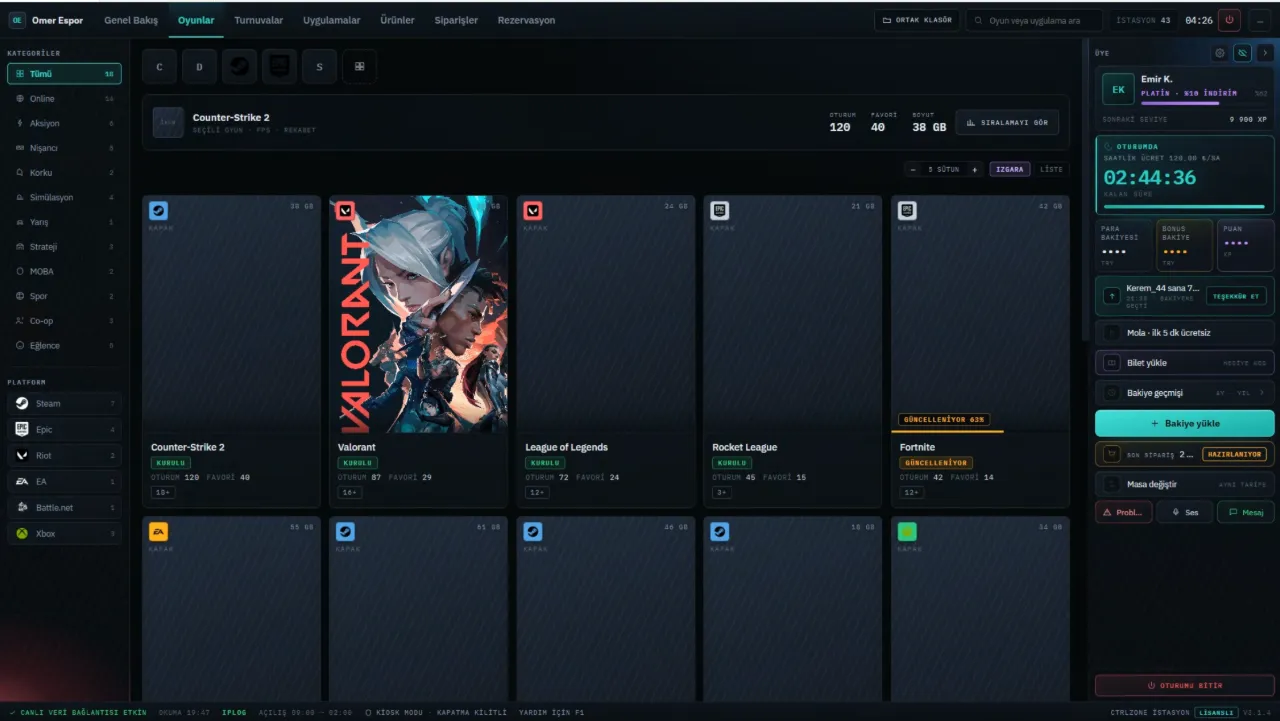
Games are always up to date

The catalog is updated centrally; players find their game in a library with cover art and launch it in one click.

Game Cloud
CtrlZone game library

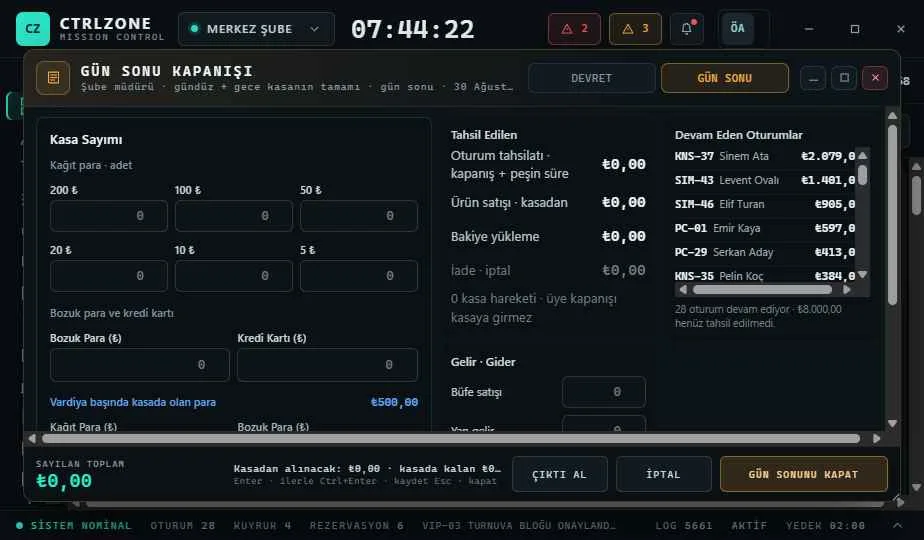
Decisions backed by numbers

How much you sold, how busy the venue is, which station earns nothing, how much VAT is due: reports are written as questions and ready for daily decisions.

Cafe Management
CtrlZone end-of-day report
// PLAYERS AND OPERATORS

Comfort for players, control for operators

FOR PLAYERS

Uninterrupted gaming

  • QR Sign-InPlayers scan a QR code with their phone and start a session without stopping at the desk.
  • Top Up and WinTopping up earns spins on the prize wheel; rewards are credited to the account instantly.
  • Order from the StationDrinks, food and time packages are ordered without leaving the seat.
  • Game LibraryCatalog with cover art, search and favorites; games always up to date.
  • Tournaments and TiersSilver, Gold and Platinum tiers; points build up with spending.
FOR OPERATORS

The whole venue on one screen

  • Floor PlanOccupied PCs, sessions about to expire and staff calls are tracked live.
  • Front Desk and ShiftsStaff only enter the cash count; only the manager sees the cash difference.
  • ReportsSales, occupancy, revenue per station and VAT reports are ready for daily decisions.
  • Staff and PermissionsRole-based permissions with per-person exceptions; every action is written to the audit log.
  • Rule-Based BonusPrize wheel, social bonus and tier rewards are granted by defined rules; no manual top-ups needed.
// WHY CTRLZONE

No need for separate programs

It is common in the industry to run a separate program for every need. CtrlZone delivers all of these functions in a single installation.

NeedCtrlZoneCommon Practice
5651 logging✓ IncludedSeparate logging software
Web filter✓ IncludedSeparate filtering software
VAT and e-invoice report✓ IncludedPrepared by hand for the accountant
Console and TV control✓ IncludedSeparate timer
Kitchen display and QR menu✓ IncludedSeparate tab software
NFC card✓ IncludedSeparate card system
Top Up and Win, Social Bonus✓ IncludedTracked by hand, credited at day end
Guest Wi-Fi and gateway✓ IncludedSeparate router software
// HOW IT WORKS

The venue keeps running even if the internet drops

The whole venue is managed through the local server at the front desk. If the connection drops, open sessions, cash and records are not affected; the venue keeps running.

  • CtrlZone CloudGame catalog, updates and encrypted backup.
  • Admin ConsoleStations, front desk, members and reservations. All venue data is stored on the local network.
  • ClientThe program on player PCs: customer screen, game launcher and tournament screen.
  • MobileMember and owner apps open in the browser; no app store needed.
// MOBILE

Your venue on your phone

Two separate apps for players and operators. No app store needed; they open in the browser and can be added to the home screen.

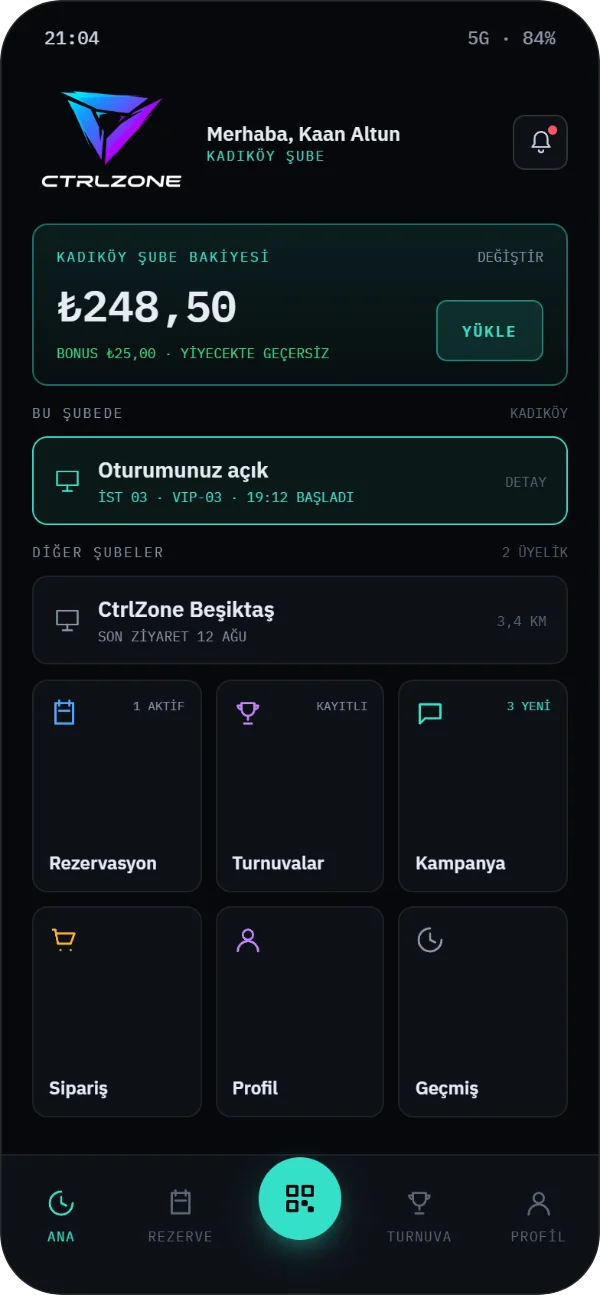
CtrlZone Member Mobile home screen: branch balance, open session and shortcuts
FOR PLAYERS

Member Mobile

  • Balance and TimeRemaining balance, time and bonus are always visible.
  • ReservationsStations, days and times are booked from the phone.
  • QR Sign-InScan the code at the station to start a session.
  • Tier and PointsTrack the points and tier earned through spending.
COMING SOONVIEW
CtrlZone Owner Mobile: live occupancy and venue status zone by zone
FOR OPERATORS

Owner Mobile

  • Live VenueOccupied PCs, open tabs and pending calls.
  • Morning SummaryYesterday’s sales and occupancy, compared with the previous week.
  • Critical AlertsCash difference, wallet change and fault alerts.
  • Remote ApprovalActions that need a manager’s approval are approved from the phone.

If you have more than one branch, switch between them with a single tap.

COMING SOON
// DEMO

Try the demo first

The screens open in your browser with sample data. Nothing connects to any computer; your changes are stored only in your own browser.

FeatureFreePaid
Floor plan, sessions and time chargesYesYes
Front desk, snack bar and Z reportYesYes
Members, balance and pointsYesYes
Cafe plan and tabsYesYes
TournamentYesYes
Member mobile app—Yes
Cloud content—Yes
POS terminal integration (add-on)—Yes
Game Platform (separate product)—Yes

Current prices are shown on the License screen in the app and in the customer portal. Game licenses are not included.

// DOWNLOAD

Install with a single file

Download the Setup Assistant and choose the computer’s role. The assistant downloads, verifies and installs only the latest version for that role.

CtrlZone Setup AssistantYou choose during setup: Main Register, Additional Register, Player PC (Client) or Game Server.Windows 10/11 · x64 · 2.4 MBYou will need your license key and an internet connection for setup.DOWNLOAD · COMING SOON
CtrlZone Member MobileNo app store needed. Members scan the QR code at the venue; the app opens in the browser and can be added to the home screen.iOS and Android · in the browserCOMING SOON

The Setup Assistant and every file it downloads are digitally signed. A file that fails the signature or integrity check is not installed.

// BRANCHES

The venue nearest to you

List venues using CtrlZone by your location; see their opening hours and whether they are open right now.

SINCE 2019

Started at Bilişim Vadisi, growing with the field

The first version of CtrlZone was developed in 2019 at the Bilişim Vadisi (Turkey’s IT Valley) incubation center. We paused the project during the pandemic and rebuilt it from scratch; today our team of 10 is back alongside venues.

// FAQ

Frequently asked questions

01Is the license priced by number of PCs?

No. Each product is licensed per branch, monthly or yearly; the number of PCs does not change the license fee.

02Does the free edition have a time limit?

No, the free edition has no time limit. It includes the core functions of Cafe Management (stations, sessions, membership and front desk).

03What happens if the internet connection drops?

The venue keeps running. Open sessions are not closed; cash, membership and balance records are not affected.

04Why are prices not listed on the website?

The license fee is calculated by branch, billing period and modules. Your exact price is shown on the License screen in the program.

05Are my card details stored?

No. Payments are taken on the secure payment page of iyzico or PayTR with 3D Secure; card details are never passed to CtrlZone.