

Esports center and iCafe management
From the front desk to player PCs, from membership to 5651 logging, all the work of a PC venue runs in one program.
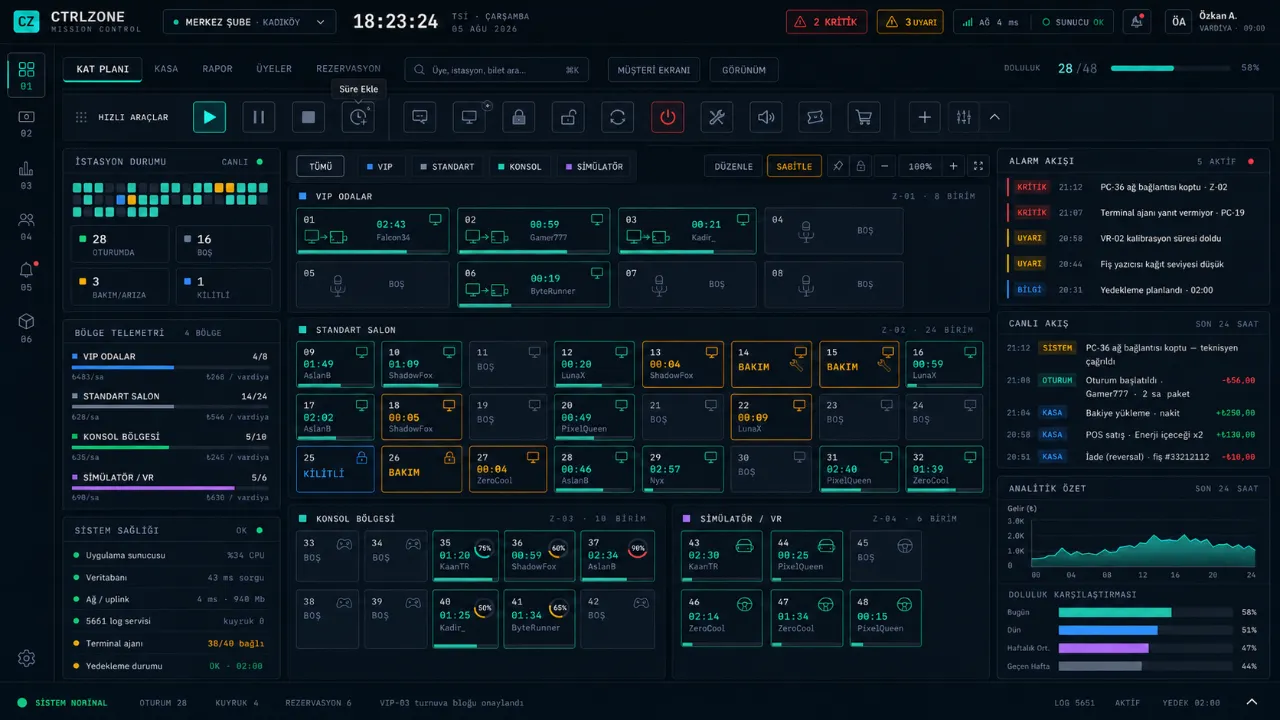
What it does
Occupied, free, reserved and faulty PCs on one screen; sessions about to expire and staff calls show up instantly.
Standard, timed, member and ticket sessions; prepaid time is protected even if rates change.
Balance, bonus, points and Silver, Gold, Platinum tiers; the Top Up and Win wheel and social bonus are granted by rules.
Staff only enter the cash count; the cash difference is visible only to the manager, and every action is written to the audit log.
With Game Cloud the catalog is updated centrally; players search for a game and launch it in one click.
Access logging is built into the program; the venue keeps working even if the internet drops.
How a day goes
This is how a typical flow in your venue runs with CtrlZone.
- 1 · OpeningStaff sign in with their own password, PIN or NFC card; the shift starts with the opening handover.
- 2 · SessionMembers open their own PC with a QR code, or the desk starts the session in one click.
- 3 · OrderPlayers order from their station; the order reaches the desk and the tab.
- 4 · Day endThe cash is counted and the Z report taken; the manager sees the difference and the day’s summary on their phone.
Getting started
Download the Setup Assistant; the Setup Guide on first launch walks you through stations, rates and the front desk step by step.