
MODULE 02 · PAID
Game Cloud
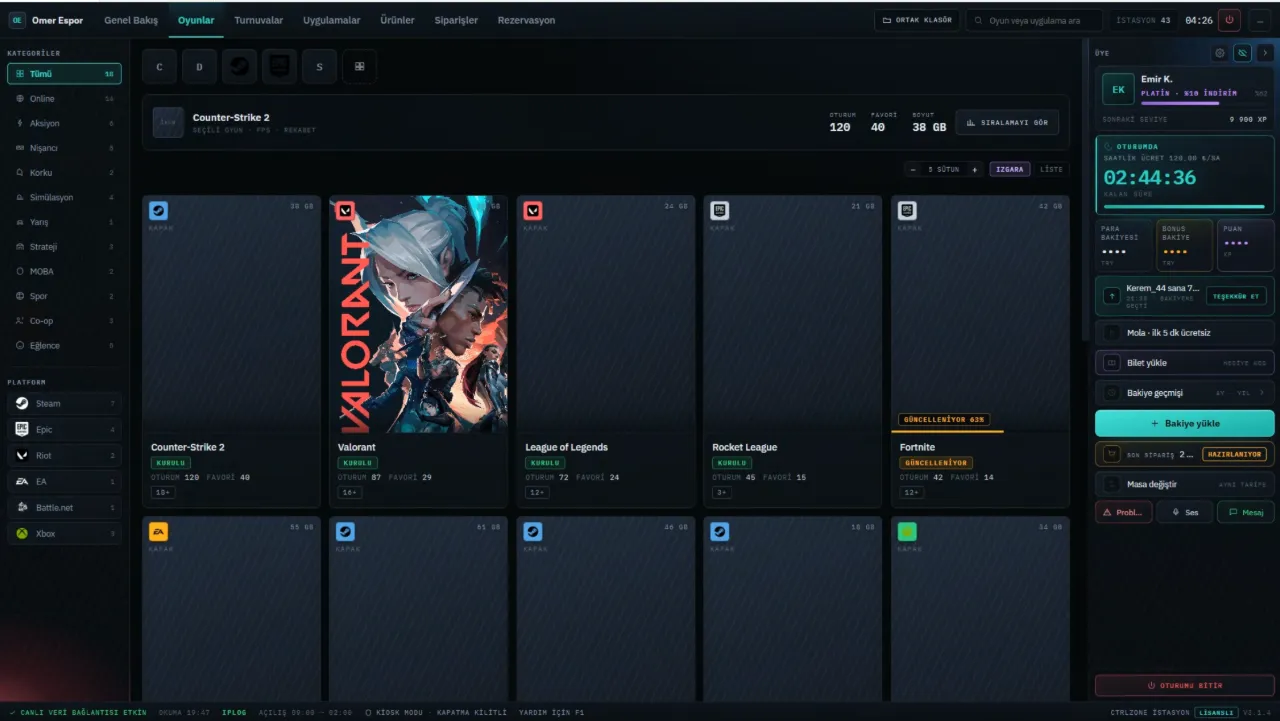
The customer screen on station PCs. The game catalog is updated from the cloud; customers easily find their game, launch it in one click and keep an eye on their time and balance.
- LICENSE
- Per branch, with paid CtrlZone
- RUNS ON
- Station PCs, Windows 10 / 11
- CATALOG
- Updated automatically from the cloud
What it does
- Cloud CatalogCover art, category and age rating arrive automatically from the center.
- One-Click LaunchSteam, Epic, Riot, EA, Battle.net and Xbox games in a single list.
- Account SecurityWhen a session ends, open game accounts are signed out automatically.
- Update StatusGames that are updating are clearly marked on the customer screen.
- Member PanelRemaining time, balance, points, tickets and orders in one panel.
- SupportCustomers can report a problem, message staff and request a station change.
Set up in three steps
- Step 1Use the Setup Assistant to install Player PC (Client) on every station PC.
- Step 2Enable Game Cloud in the Admin Console; the catalog loads automatically.
- Step 3Match the installed games; they are listed on the customer screen.
// LICENSE
Works with a paid CtrlZone license.
CtrlZone Setup AssistantSystem: Windows 10 / 11 · 64-bitSize: 2.4 MBRole: Player PC (Client), on every station PCDOWNLOAD · COMING SOON